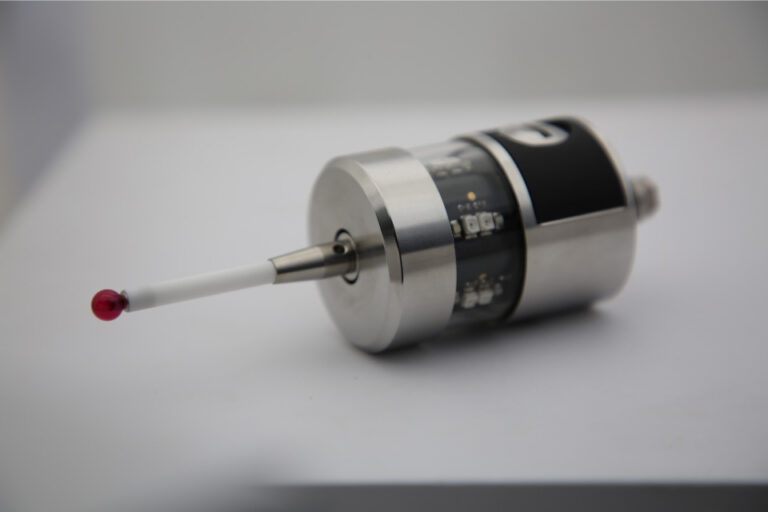
Temperature Effects on Probe Accuracy (and How to Compensate Without Fooling Yourself)
If probe measurements ever “mysteriously” shift between morning and afternoon…
…it’s usually not the probe having a mood swing. It’s temperature quietly bending the rules.
Temperature is the most polite source of error in metrology: it rarely crashes anything, it just nudges results until you stop trusting your numbers—or worse, you trust them when you shouldn’t.
This guide breaks down:
where temperature errors actually come from (machine + probe + part + air)
how big they can be (with a simple mental-math model)
how to compensate correctly (and what “compensation” cannot fix)
a practical shop-floor checklist that doesn’t require a climate-controlled cathedral
Table of Contents
First principles: You’re measuring at 20 °C—even if your shop isn’t
Dimensional metrology is anchored to a standard reference temperature: 20 °C. ISO 1 formalizes that “standard reference temperature” concept and keeps the long-established value at 20 °C.
So when you compare a part to its drawing, you’re implicitly comparing to geometry specified at 20 °C.
That’s the key idea behind almost every temperature-compensation approach:
Measure at whatever temperature you’re at, then mathematically “translate” results back to 20 °C.
But here’s the trap: you can only translate what you actually know.
The four ways temperature attacks probe accuracy
1) The part changes size (often the biggest effect)
Your workpiece expands or contracts with temperature according to its coefficient of thermal expansion (CTE).
The core relationship is:ΔL=α⋅L⋅ΔT
It’s a standard engineering relationship and shows up explicitly in common CTE references.
What this means in real life: Even if your probe and machine were perfect, the part isn’t the same part at 27 °C as it is at 20 °C.
2) The CMM structure and scales change (machine geometry drifts)
CMMs use temperature sensors on axes/scales to compensate changes in the machine’s measurement system as temperatures move. Renishaw explicitly notes axis sensors are used to “monitor and compensate” temperature changes in the CMM’s scale system.
If the machine warms unevenly (thermal gradients), scale/geometry errors can grow in a way that looks like “probe error” but isn’t.
3) The probe/stylus changes length and behavior
https://cnc-probe.com/cnc-probes-stylus/Stylus length changes with temperature too (same physics), and probe triggering dynamics can shift with temperature, mounting stresses, and gradients. The net effect can show up as:
slightly different trigger points
direction-dependent differences
drift after warm-up
4) Temperature gradients (the villain)
Gradients are worse than “everything is 3 °C warmer.”
Why?
Uniform temperature shift = easier to correct.
Gradients = bending, warping, and local differences between what your sensors read and what the structure/part actually is.
Some CMMs market specific robustness to high temperature gradients (e.g., ZEISS “HTG” options) precisely because gradients are so disruptive.
A quick “how bad can it be?” mental model (you can do in your head)
Let’s say you’re measuring a 500 mm steel feature and the part is at 25 °C but the drawing is effectively at 20 °C.
ΔT = 5 °C
α (steel) is around ~11–12 × 10⁻⁶ /°C (order-of-magnitude; varies by alloy)
L = 500 mm
ΔL≈12×10−6⋅500⋅5=0.03 mm=30μm
Thirty microns. From temperature alone. No “bad probe” required.
This is why temperature discussions are not academic—they’re tolerance killers.
Compensation: what it can fix vs what it can’t
What compensation can fix (when set up right)
A) Machine/scale compensation Axis temperature sensors feed the controller/software so the CMM can compensate changes in the scale system as temperatures vary.
B) Part (workpiece) compensation You measure the part temperature and apply CTE-based scaling to report results at the reference temperature (usually 20 °C). Software workflows explicitly use a material CTE and measured part temperature to drive compensation.
What compensation cannot fix (even with fancy sensors)
Unknown gradients inside the part (surface is 24 °C, core is 29 °C—your single sensor lies)
Non-equilibrium (part still cooling after machining)
Mechanical instability (loose stylus, probe mount issues, vibration) — compensation won’t save you
Compensation is math. It doesn’t replace physical stability.
The “DeepMind” part: the compensation triangle (Machine–Part–Reference)
Most shops treat temperature compensation like a single switch: ON/OFF.
A better mental model is a triangle:
Machine knows its own temperature field (axis sensors, gradients, warm-up behavior)
You know the part temperature that matters (not just “near it”)
You know what reference temperature you’re reporting to (20 °C)
Break any corner of the triangle and your “compensated” result becomes a confidently formatted guess.
A practical shop procedure that actually works
Step 1 — Decide what you’re controlling: accuracy to spec or repeatability to process?
If you’re doing process control (same setup, same time of day), you may prioritize repeatability.
If you’re doing spec conformance against drawing tolerances, you need temperature correctness.
This choice determines how hard you go on sensors, soak time, and compensation settings.
Step 2 — Stabilize the machine first
Follow your machine warm-up routine.
Make sure axis sensors are present/functional and mounted properly (and consider multiple sensors if gradients are a known issue; gradient guidance is explicitly discussed in installation-style documentation).
Step 3 — Measure part temperature like you mean it
Best practice in a shop environment:
Measure at multiple points for large parts
Measure near the features you care about
Recheck if the part has just come off a hot process (machining, wash, deburr)
Temperature-compensation workflows explicitly rely on part temperature inputs (manual or automatic), so garbage-in becomes garbage-out.
Step 4 — Use the correct CTE (or you’re “compensating” wrong)
If your software asks for CTE, treat it as a controlled parameter, not a checkbox:
confirm the material grade (or use a validated effective CTE for your specific production material)
be careful with mixed materials and assemblies
PC-DMIS documentation highlights selecting/using a material CTE as part of compensation setup.
Step 5 — Pick the right compensation mode
Common options you’ll see in metrology systems:
Machine-only compensation (axis/scale)
Part-only compensation (CTE scaling)
Machine + Part compensation (usually the goal)
Manual vs automatic part temp (depends on sensors and workflow)
Your rule of thumb:
If you don’t have reliable part temperature measurement, don’t pretend you do. Report “as measured” with the temperature recorded, or enforce soak to near 20 °C.
Step 6 — Validate with a temperature-aware check, not just a single artifact
Do this weekly/monthly:
Run your standard probe performance/repeatability test at two different stable temperatures (e.g., morning vs afternoon) and compare results with and without part compensation.
If results “improve” only when compensation is ON, you’re likely correcting real thermal expansion.
If results get weirder when compensation is ON, you likely have bad inputs (CTE, part temp, gradients).
The most common compensation mistakes (and how to avoid them)
Mistake 1: “We turned on compensation, so we’re good.”
Compensation depends on sensor placement, gradient behavior, and correct inputs—especially for part temperature and CTE.
Mistake 2: Measuring air temperature and calling it part temperature
Air temp is not part temp unless the part has equilibrated.
Mistake 3: Using a single part temperature point on a large part
Large parts + recent machining + airflow = gradients. Your one sensor may be telling the truth about one spot only.
Mistake 4: Using “generic steel” CTE for everything
Close is not correct when tolerances are tight.
Mistake 5: Ignoring gradients in the machine structure
Thermal gradients are explicitly treated as a design/performance challenge (hence “high temperature gradient” options).
A simple compensation checklist you can paste into your SOP
Before measurement
Machine warm-up complete
Axis temperature sensors healthy/connected (machine comp active)
Part has soaked or part temperature measured (multiple points for large parts)
Correct material CTE selected/verified
Reference temperature is 20 °C (reporting intent understood)
During measurement
Avoid airflow directly on part or machine (fans, open doors)
If cycle is long: recheck part temperature mid-run (especially for thin parts)
After measurement
Record: ambient temp, part temp(s), compensation mode, CTE used
If results are near a tolerance edge: confirm with a repeat run after additional soak
The “best” strategy depends on your reality (choose your path)
Path A: You can enforce soak near 20 °C
This is the cleanest. Minimal compensation risk, maximum interpretability.
Path B: You must measure at varying temperatures (true shop-floor metrology)
Then invest in:
robust machine temperature compensation (axis sensors, gradient awareness)
part temperature sensing + correct CTE workflows
and a validation routine that proves your compensation is helping, not hallucinating